
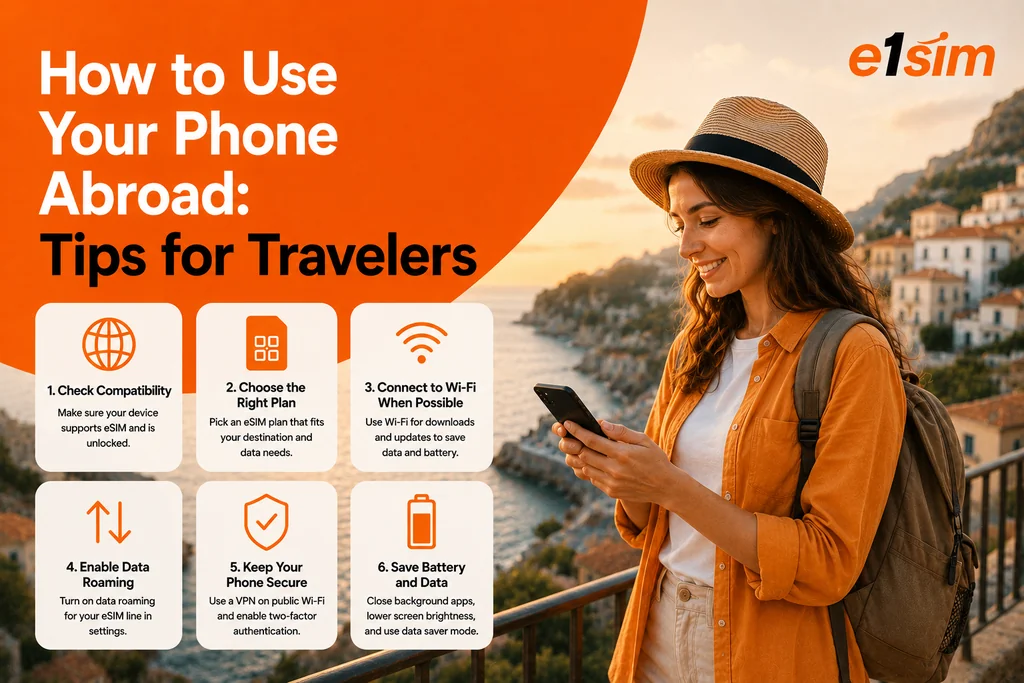
How to Use Your Phone Abroad: Essential Tips for Travelers
Your smartphone is one of your most valuable travel companions — for navigation, communication, translation, and more. But using it internationally without the right setup can lead to unexpectedly large bills or frustrating connectivity gaps. Here's how to stay connected smartly and affordably when using your phone abroad.
Step 1: Check Your Phone's International Capability
Before anything else, confirm your phone can work in your destination:
- Verify it's carrier unlocked — locked phones can only use SIM cards from their original carrier. To use a travel eSIM or foreign SIM card, you need an unlocked device.
- Check network band compatibility — most modern phones support the frequency bands used worldwide, but very old devices may only work on certain regional networks.
- Confirm eSIM support if you plan to use a travel eSIM — go to Settings and look for an eSIM or "Add Cellular Plan" option.
Step 2: Choose Your Connectivity Strategy
You have several options for mobile connectivity abroad:
Option 1: International Roaming from Your Home Carrier
Convenient but usually expensive. Check your carrier's international add-ons or daily passes before assuming standard roaming is acceptable.
Option 2: Travel eSIM
The most cost-effective option for most travelers. Purchase a data plan digitally, install it on your phone, and connect to local networks at local rates. No physical SIM swapping required. Particularly good for:
- Travelers with eSIM-compatible, unlocked phones
- Trips of 3+ days where roaming daily passes add up
- Multi-country trips (use a regional eSIM plan)
Option 3: Local SIM Card
Best value if your phone isn't eSIM-compatible. Buy a prepaid local SIM at your destination airport or a carrier store. You'll get a local number and affordable local rates.
Option 4: Wi-Fi Only
For very short trips or budget-focused travelers. Disable data roaming entirely and rely on hotel Wi-Fi, restaurant Wi-Fi, and downloaded offline content. Works well for leisure trips but limiting for business or navigation-heavy travel.
Step 3: Configure Your Phone Before Departing
Disable Data Roaming (Initially)
Turn off data roaming to prevent unexpected charges if you're not on a roaming plan:
- iPhone: Settings → Cellular → Cellular Data Options → toggle Data Roaming off
- Android: Settings → Connections → Mobile Networks → toggle Data Roaming off
You can re-enable it specifically for your travel eSIM profile when needed.
Download Offline Maps
Don't wait until you land to download offline maps. Download Google Maps or Apple Maps for your destination while on Wi-Fi at home. This gives you navigation capability even without any data connection.
Enable Wi-Fi Calling
Wi-Fi calling lets you use your regular phone number over Wi-Fi connections abroad, often at domestic rates. Enable it before you travel in your phone's settings.
Install Your Travel eSIM
If using a travel eSIM, install it before departure using your home Wi-Fi. The profile installs quickly and you'll be ready to activate on arrival.
Step 4: Managing Data While Abroad
Reduce Background Data
- Disable cloud backup over mobile data (iCloud, Google Photos)
- Turn off app auto-updates
- Disable social media video autoplay
- Enable Low Data Mode (iPhone) or Data Saver (Android)
Monitor Your Usage
Reset your data usage counter at the start of your trip for accurate tracking. Check usage daily until you get a feel for your typical daily consumption against your plan's allowance.
Step 5: Security Tips for Using Your Phone Abroad
- Use a VPN on public Wi-Fi networks (airports, hotels, cafes) to encrypt your traffic.
- Enable Find My Phone (iPhone: Find My, Android: Find My Device) before you travel.
- Don't access banking apps on unsecured public Wi-Fi — use your eSIM data connection instead.
- Keep your phone face-down in cafes and be aware of your surroundings in crowded tourist areas.
- Set up remote wipe in case your phone is lost or stolen.
Key Apps to Have Ready
- Maps: Google Maps or Apple Maps with offline downloads
- Translation: Google Translate with offline language packs
- Communication: WhatsApp, Telegram, or Signal for free messaging and calling
- Currency: XE Currency converter
- Emergency: Know the local emergency number and have it saved
Conclusion
Using your phone abroad smartly is primarily about preparation: check your device's capabilities, choose the right connectivity option (travel eSIM is often the best choice), configure key settings before you leave, and keep some simple data-saving habits in mind while traveling. Do this right, and your smartphone will be an indispensable travel companion — without the bill shock when you get home.